HEVC Codec 参数在视频播放中的应用

Codec 是什么怎么用
在 Web 平台播放视频,大概率会直接使用 <video /> 标签,MDN 推荐开发者使用 <source /> 标签来加载资源且通过 type 属性指定其媒体类型(MIME type):
<video>
	<source src="//cdn.com/video.webm" type="video/webm" />
	<source src="//cdn.com/video.mp4" type="video/mp4" />
</video>
“If the type attribute isn’t specified, the media’s type is retrieved from the server and checked to see if Gecko can handle it; if it can’t be rendered, the next source is checked. If the type attribute is specified, it’s compared against the types Gecko can play, and if it’s not recognized, the server doesn’t even get queried; instead, the next source element is checked at once.” — from MDN
可见 type 属性的指定有利于加速视频的首播。
使用 type 属性时除了声明视频的文件(容器)类型,还可以通过 codecs 参数来声明其编码类型:
<video>
	<source src="//cdn.com/video.webm" type="video/webm;codecs=vp08.00.41.08" />
	<source src="//cdn.com/video.mp4" type="video/mp4;codecs=avc1.64001f" />
</video>
这在部署一些新型的编码格式时非常有用(例如 H.265),可以做到比较好的向下兼容。
在 type 属性中之所以命名为 codecs,是因为可以通过该参数指定多个轨道的编码信息(例如音频)。例如:
video/webm;codecs="vp08.00.41.08,vorbis"表明了这是一个使用 VP8 格式视频和 Vorbis 格式音频的 WebM 媒体资源。
因此,codec 参数表明了媒体资源的编码参数,用于指定媒体的编解码器及其配置。
codec 参数还常在 MediaSource、WebCodecs 等 API 中使用。例如:
- 在 MSE 中判断是否支持某种编码格式:
MediaSource.isTypeSupported('video/mp4;codecs=hvc1.1.6.L93.90') - 在 WebCodecs 中配置解码器:
const decoder = new VideoDecoder(init);
decoder.configure({
  codec: 'vp8',
  codedWidth: 640,
  codedHeight: 480
});
近期我在 Web 平台上部署 HEVC 时使用 Codec 参数用做支持性检测,借本文对 HEVC Codec 参数的语法及解析方式进行一些总结。相关内容参考了标准文件和开源代码,如有错误,还望大家斧正。
Codec 语法解析
参考 RFC6381 中 Section 3.2 的定义,Codec 的基本语法如下:
[cod-simple][cod-fancy]一些媒体类型只允许指定要使用的编解码器名称(cod-simple),而有些媒体类型还允许对这些编解码器指定各种配置(cod-fancy)。例如:
audio/ogg; codecs="vorbis"video/mp4; codecs="avc1.4d002a"video/mp4; codecs="hvc1.1.6.L93.90"
其中 vorbis、avc1、hvc1 是编解码器名称,. 后面的是编解码器配置,其语法因编解码器而异。
HEVC Codec 的语法如下:
[codec_tag].[general_profile_space][general_profile_idc].[general_profile_compatibility_flags].[general_tier_flag][general_level_idc].[general_constraint_indicator_flags]
即用 . 号分割以下几个部分:
- [codec_tag]
- [general_profile_space][general_profile_idc]
- [general_profile_compatibility_flags]
- [general_tier_flag][general_level_idc]
- [general_constraint_indicator_flags]
每个 [] 都是一个具体的编解码器配置,要理解这些配置的含义,需要对 H.265 的编码结构有所了解。
codec tag
[codec_tag]: 其值是 hev1 或者 hvc1。两种不同的 tag 都表示 HEVC 编解码器,区别是在 MP4 中对应不同的 Box 类型。
hev1: stsd -> hev1 -> hvcC
hvc1: stsd -> hvc1 -> hvcC
MacOS 平台上只兼容 hvc1 类型,因此通常转码服务会把所有 H.265 视频都统一成 hvc1 的 Box。
profile
在 H.265/HEVC 中有对档次(Profile)、级别(Level)和层(Tier)的概念,它们规定了码流必须要遵守的一些限制要求。档次、层和级别为多种不同应用提供了兼容性。
档次主要规定编码器可采用哪些编码工具或算法,满足某一 Profile 的解码器必须支持该 Profile 中的所有特性。在 Codec 中 Profile 信息由两个字段决定:分别 general_profile_space 和 general_profile_idc。
general_profile_space
它规定了一个档次空间,包含所有档次的 ID 号和对应的内容。其取值有:
| 字段取值 | 空间值 |
|---|---|
| 空 | 0 |
| A | 1 |
| B | 2 |
| C | 3 |
在当前的标准中,其值始终取 0。该字段的其他值保留将来使用。
general_profile_idc
根据 HEVC Spec 2021,HEVC 一共存在 11 种 Profile。在 codec 里该字段的值是以十进制表示的。每个值对应的 Profile 如下。
HEVC Version 1 定义的三种基础 Profile:
| 值 | Profile | 说明 |
|---|---|---|
1 | HEVC Main Profile | 最高支持 8bit 和 YUV420, 苹果老款不支持杜比视界的 iPhone 拍出来都是这种 |
2 | HEVC Main 10 Profile | 最高支持 10bit 和 YUV420, 苹果新款支持杜比视界(HLG8.4)的 iPhone 拍的 HDR 视频都是这种 |
3 | HEVC Main Still Picture Profile | 全部的码流只能一帧编码的视频(意即禁用帧间预测),一个「传说」中的 Profile,市面上从未见过这类视频 |
下面是后面规范新增的 8 种 Profile:
| 值 | Profile | 说明 |
|---|---|---|
4 | HEVC Rext Profile | range extension(HEVC 扩展格式,HEVC Version2 新增),最高支持 16bit 和 YUV444,佳能/索尼/尼康等新机型拍出来的 422 10bit HEVC 都是这种 |
后面的这 7 种都是存在于 Spec上 的 Profile,都不能硬解:
| 值 | Profile | 说明 |
|---|---|---|
5 | HEVC High Throughput Profile | - |
6 | HEVC Multiview Main Profile | - |
7 | HEVC Scalable Main Profile | - |
8 | HEVC 3d Main Profile | - |
9 | HEVC Screen Extended Profile | - |
10 | HEVC Scalable Rex Profile | - |
11 | HEVC High Throughput Screen Extended Profile | - |
general_profile_compatibility_flags
兼容性标志位(compatibility flags)将通过档次自动确定,是一个 32-bit 的十六进制数字。
for (j=0; j<32; j++)
	general_profile_compatibility_flags[j];
当 general_profile_space 等 于 0 时, general_profile_compatibility_flags[j] 位的值为 1 则表示当前使用的档次的 ID 号为 j。即:
general_profile_compatibility_flags[4] = 1代表当前的档次 ID 号为4- 即
general_profile_compatibility_flags = '0000 ... 0001 0000' - 即
general_profile_compatibility_flags的值为0x10
依照 general_profile_idc 的设定,general_profile_compatibility_flags 可能的值如下:
下面简写为
compatibility_flags
| - | 二进制结果 | 十六进制数字 | Profile | 说明 |
|---|---|---|---|---|
compatibility_flags[1] = 1 | 0000 0000 0110 | 6 | HEVC Main Profile | Spec A.3.2: When general_profile_compatibility_flag[1] is equal to 1, general_profile_compatibility_flag[2] should be equal to 1 as well |
compatibility_flags[2] = 1 | 0000 0000 0100 | 4 | HEVC Main 10 Profile | - |
compatibility_flags[3] = 1 | 0000 0000 1110 | E | HEVC Main Still Picture Profile | Spec A.3.4: When general_profile_compatibility_flag[3] is equal to 1, general_profile_compatibility_flag[1] and general_profile_compatibility_flag[2] should be equal to 1 as well. |
compatibility_flags[4] = 1 | 0000 0001 0000 | 10 | HEVC Rext Profile | - |
compatibility_flags[5] = 1 | 0000 0010 0000 | 20 | HEVC High Throughput Profile | - |
compatibility_flags[6] = 1 | 0000 0100 0000 | 40 | HEVC Multiview Main Profile | - |
compatibility_flags[7] = 1 | 0000 1000 0000 | 80 | HEVC Scalable Main Profile | - |
compatibility_flags[8] = 1 | 0001 0000 0000 | 100 | HEVC 3d Main Profile | - |
compatibility_flags[9] = 1 | 0010 0000 0000 | 200 | HEVC Screen Extended Profile | - |
compatibility_flags[10] = 1 | 0100 0000 0000 | 400 | HEVC Scalable Rex Profile | - |
compatibility_flags[11] = 1 | 1000 0000 0000 | 800 | HEVC High Throughput Screen Extended Profile | - |
level&tier
级别则是指根据解码端的负载和存储空间情况对关键参数加以限制(如最大采样频率、最大图像尺寸、分辨率、最小压缩率,最大比特率和解码缓冲区大小等)。考虑到应用可以依据最大的码率和解码缓冲区大小来区分,因此有些 Level 定义了两个 Tier:主层(Main Tier)和高层(High Tier)。主层用于大多数应用,高层用于那些最苛刻的应用。
满足某一 Level 或 Tier 的解码器应当可以解码当前 Level 和 Tier,以及比当前 Level 和 Tier 更低的 Level 和 Tier 的所有码流。
general_level_idc
下表中 13 个 Level 包含在标准第一版中:
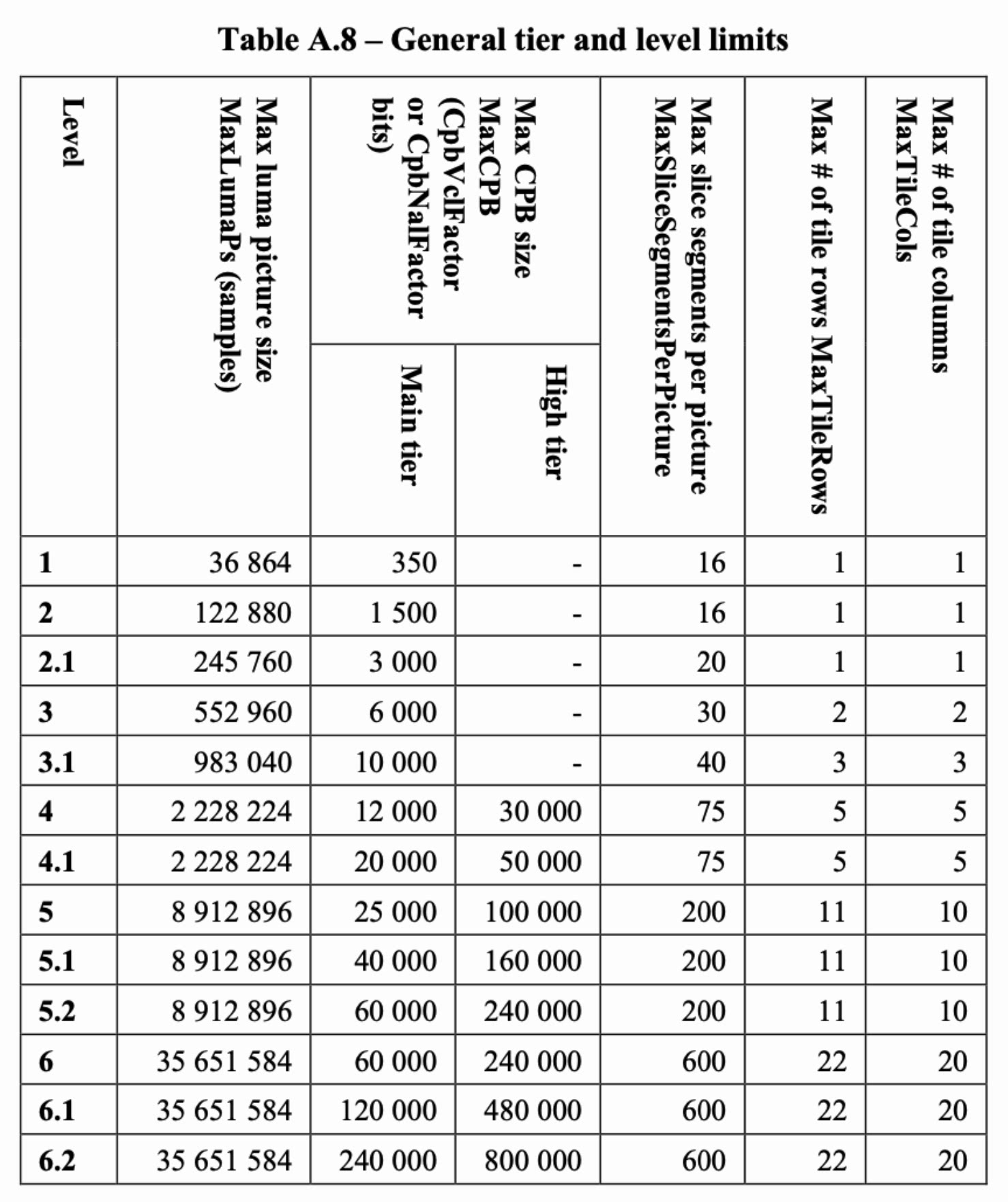
general_level_idc 字段的值以十进制表示,为允许的等级数的 30 倍,即 level = general_level_idc/30。因此有以下值:
30: Level 160: Level 263: Level 2.190: Level 393: Level 3.1120: Level 4123: Level 4.1150: Level 5153: Level 5.1156: Level 5.2180: Level 6183: Level 6.1186: Level 6.2
general_tier_flag
general_tier_flag 以字母表示。其值含义:
L: Main Tier 用于大多数应用H: High Tier 用于那些最苛刻的应用
constraint indicator flags
general_constraint_indicator_flags 是由 6 个以句点分割的十六进制数字组成的一组数字。示例格式:
B0.23.00.00.00.90这组数字表示 6 字节(48 位)大小的约束标志,每个字节的编码由句点分隔,可以省略为零的尾随字节。即:
B0.90.0.0.0.0可省略为B0.90B0.0.0.0.0.90不可写为B0.90
这 48 位由以下信息组成:
| 字段 | 占位数 | 含义 |
|---|---|---|
general_progressive_source_flag | 1 | 指定 CVS(Coded Video Sequence 已编码视频序列)中图像的扫描方式 |
general_interlaced_source_flag | 1 | 同上 |
general_non_packed_constraint_flag | 1 | 指明明 CVS 中是否存在打包成帧的 SEI(Supplemental Enhancement Information 补充增强信息) |
general_frame_only_constraint_flag | 1 | 图像类型。为 1 时表明 CVS 中所有图像为帧;为 0 时表示 CVS 中的所有图像为场 |
general_reserved_zero_44bits | 44 | 其值为 0,解码器会忽略该值 |
下文为表述简洁将字段简写,去掉前缀
general_。即general_progressive_source_flag将写为progressive_source_flag
progressive_source_flag 和 interlaced_source_flag 用于指定 CVS 中图像的扫描方式:
- 当
progressive_source_flag为 0 且interlaced_source_flag为 1,则为隔行扫描; - 当
progressive_source_flag为 1 且interlaced_source_flag为 0,则为逐行扫描; - 当
progressive_source_flag为 0 且interlaced_source_flag为 0,则扫描类型未知; - 当
progressive_source_flag为 1 且interlaced_source_flag为 1,则代表预留未来适用的方式。
frame_only_constraint_flag 实际指示 field_seq flag 的值是否为 0。关于图像类型的推导关系从由小及大的优先级是:
- SEI 中的
pic_struct表示每幅图像的图像类型,但它是可选语法元素,所以存在时应与 VUI 的field_seq_flag取值一致;不存在时由field_seq_flag推断得到; - VUI 的
fleld_seq_flag=0表示 CVS 中所有图像为帧,flied_seq_flag=1表示 CVS 中所有图像为场,当filed_seq_flag也无法获取时pic_struct设为 0; - SPS 语法元素
frame_only_constraint_flag作为必需的语法元素也表示图像类型,frame_only_constraint_flag=1表明fleld_seq_flag=0即 CVS 所有图像为帧。
CVS, SEI 都是 H.265 编码标准的专有名词。
常见示例值:
| 十六进制 | 二进制 | progressive_source_flag | interlaced_source_flag | non_packed_constraint_flag | frame_only_constraint_flag |
|---|---|---|---|---|---|
0xB0 | 0b10110000 | 1 | 0 | 1 | 1 |
0x90 | 0b10010000 | 1 | 0 | 0 | 1 |
0x70 | 0b01110000 | 0 | 1 | 1 | 1 |
0x50 | 0b01010000 | 0 | 1 | 0 | 1 |
Codec 示例解读
hev1.1.6.L93.B0
以句号 . 分割每一位的含义:
- hev1:
code_tag=hev1,代表是 hev1 Box 类型 - 1:
general_profile_space=0: 代表档次空间为空,以档次 ID 决定具体档次general_profile_idc=1: ,代表 Main Profile
- 6:
general_profile_compatibility_flags=6 - L93:
general_tier_flag=L: Main Tiergeneral_level_idc=93: Level 3.1
- B0: 即
0b10110000progressive_source_flag=1interlaced_source_flag=0non_packed_constraint_flag=1frame_only_constraint_flag=1
a progressive, non-packed stream, Main Profile, Main Tier, Level 3.1.
hvc1.A4.41.H120.B0.23
以句号 . 分割每一位的含义:
- hvc1:
code_tag=hvc1,代表是 hvc1 Box 类型 - A4:
- A:
general_profile_space=1 - 4:
general_profile_idc=4
- A:
- 41:
general_profile_compatibility_flags=41 - H120
general_tier_flag=H: High tiergeneral_level_idc=120: Level 4
- B0.23: 即
0b10110000.0b100011
a progressive, non-packed stream in profile space 1, with general_profile_idc 4, some compatibility flags set, and in High tier at Level 4 and two bytes of constraint flags supplied.
Codec 如何获取
Codec 的获取方式取决于具体的容器格式和编码格式(码流结构)。
以容器格式 MP4 为例,Codec 信息存储在 Sample Description Box(stsd, moov/trak/mdia/minf/stbl/stsd) 内。stsd 主要包含了采样数据的细节信息,包括编码类型以及解码需要的各种初始化数据信息:
- HEVC 编码的视频,Codec 参数通过 stsd 下 hvcC 类型 Box 提取
- AVC 编码的视频,Codec 参数通过 stsd 下 avcC 类型 Box 提取
示例数据:HEVC 视频 track 对应的 hvcC Box

以编码格式 AVC/HEVC 为例,其压缩数据采用了分层结构,将属于 GOP 层、Slice 层中共用的大部分语法元素游离出来,组成序列参数集(Sequence Parameter Set,SPS)和图像参数集(Picture Parameter Set,PPS)。SPS 的内容大致包括解码相关信息,如档次级别、分辨率、某档次中编码工具开关标识和涉及的参数、时域可分级信息等。因此 Codec 从 SPS 中进行获取。
对于 HEVC 来说, 从 SPS 提取 Codec 参数具有更广泛的应用场景,兼容所有支持 HEVC 的容器格式。因此在实现通用播放器时,常常会定义 SPS 信息提取的共用方法或类。下面以 HEVC 的 MP4 视频为例,看看如何提取和解析 Codec。
参数提取
在 MP4 文件中 SPS 以原始码流格式存在于的 hvcC Box 中。如上所诉,hvcC box 在 MP4 中的结构是:moov -> trak -> mdia -> minf -> stbl -> stsd -> hvcC。在 MP4 文件中提取 hvcC Box 不在本文的介绍范畴。
获取 SPS
hvcC Box 的定义参考标准 ISO/IEC 14496-15:2022 中的 8.3.2.1.2 Decoder configuration information - Syntax 章节:
class HEVCDecoderConfigurationRecord {
   unsigned int(8) configurationVersion = 1;
   unsigned int(2) general_profile_space;
   unsigned int(1) general_tier_flag;
   unsigned int(5) general_profile_idc;
   unsigned int(32) general_profile_compatibility_flags;
   unsigned int(48) general_constraint_indicator_flags;
   unsigned int(8) general_level_idc;
   bit(4) reserved = ‘1111’b;
   unsigned int(12) min_spatial_segmentation_idc;
   bit(6) reserved = ‘111111’b;
   unsigned int(2) parallelismType;
   bit(6) reserved = ‘111111’b;
   unsigned int(2) chroma_format_idc;
   bit(5) reserved = ‘11111’b;
   unsigned int(3) bit_depth_luma_minus8;
   bit(5) reserved = ‘11111’b;
   unsigned int(3) bit_depth_chroma_minus8;
   bit(16) avgFrameRate;
   bit(2) constantFrameRate;
   bit(3) numTemporalLayers;
   bit(1) temporalIdNested;
   unsigned int(2) lengthSizeMinusOne;
   unsigned int(8) numOfArrays;
   for (j=0; j < numOfArrays; j++) {
      bit(1) array_completeness;
      unsigned int(1) reserved = 0;
      unsigned int(6) NAL_unit_type;
      unsigned int(16) numNalus;
      for (i=0; i< numNalus; i++) {
         unsigned int(16) nalUnitLength;
         bit(8*nalUnitLength) nalUnit;
      }
   }
}
hvcC box 的最后有一个 HVCCNALUnitArray (for (j=0; j < numOfArrays; j++) ),它是 HEVC 码流的 NALU(Network Abstraction Layer Unit) 单元。每个 NALU 既可以承载视频片(Slice)的压缩数据, 也可以承载处理图像所需要的参数数据。承载视频片压缩数据的 NALU 被称为 VCLU (VCL NALU),承载其他信息的 NALU 被称为 non-VCLU(non-VCLNALU)。
hvcC box 中的 NAL_unit_type 为 6 位,取值范围是[0,63],标识当前 NALU 载荷信息的内容特性,称为 NALU 类型。下面是 NALU 类型与载荷内容信息的关系:
| NALU 类型值 | NALU 类型 | NALU 载荷内容 | NALU 分类 |
|---|---|---|---|
| 32 | VPS_NUT | 视频参数集 | non-VCL |
| 33 | SPS_NUT | 序列參数集 | non-VCL |
| 34 | PPS_NUT | 图像参数集 | non-VCL |
因此我们可以通过该字段来判断并提取 SPS NALU:
let sps;
const nalus = [];
const byte = new ByteBuffer(arrayBuffer);
const numOfArrays = byte.read(1);
for (let i = 0; i < numOfArrays; i++) {
    const naluData: Uint8Array[] = [];
    const bit = new BitBuffer(byte.read(1));
    const completeness = bit.read(1);
    bit.read(1);
    const type = bit.read(6);
    const numNalus = byte.read(2);
    for (let j = 0; j < numNalus; j++) {
        const uint8array = new Uint8Array(byte.read(2)).map(() => byte.read(1));
        naluData.push(uint8array);
        if (type === 33) {
            sps = parseSPS(uint8);
        }
    }
    nalus.push({
        completeness,
        type,
        data: naluData,
    });
}
ByteBuffer 和 BitBuffer 的定义参考附录
解析 SPS
接下来实现 parseSPS 方法。
所有的视频压缩数据被封装成一个个的 NALU,它们具有统一的语法结构。 HEVC 的 NALU 结构如图所示:
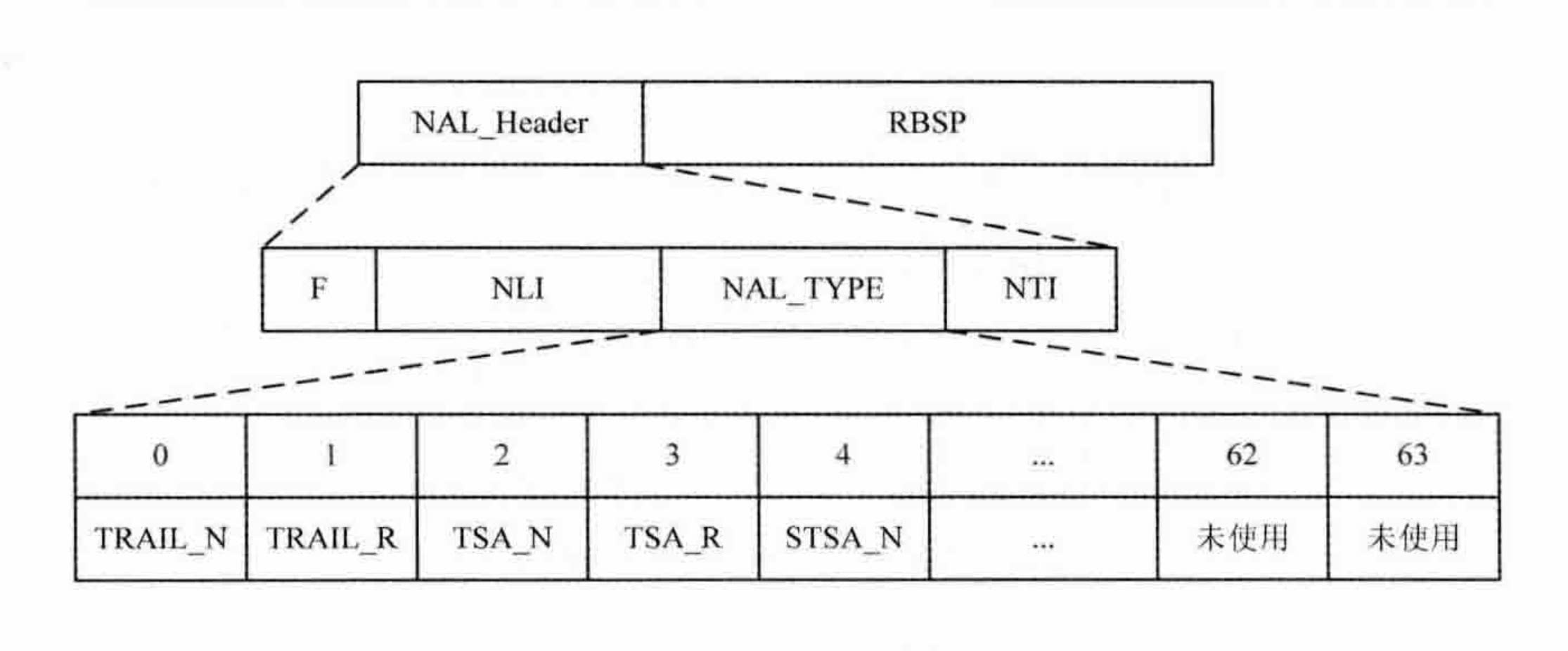
每一个 NALU 包含两部分:NALU 头(Header)和 NALU 载荷(Payload) 。 NALU 头长度为固定的两字节,反映 NALU 的内容特征。NALU 载荷长度为整数字节,承载视频压缩后的比特流片段。
视频编码过程中输出包含不同内容的压缩数据比特流片段,这些比特流片段称为 SODB(String Of Data Bits), SODB 为最高位有效(Most Significant)的存储形式,即字节内的比特按照从左到右、从高到低的顺序排列。在 SODB 后添加 RBSP 尾(rbsp_trailing_bits) 就生成了原始字常序列载荷(Raw Byte Sequence Payload, RBSP),RBSP 尾由称为 RBSP 停比特的一个比特 1 和其后的零个或多个比特 0 组成 。RBSP 即为整数字节化的 SODB,RBSP 的数据类型即为 SODB 的数据类型。由 SODB 生成 RBSP 的过程这里不做介绍。
RBSP 可以包含一个 SS 的压缩数据、VPS、SPS、PPS、补充增强信息等,也可以为定界、序列结束、比特流结束、填充数据等。
HEVC 中每个 VCLU 包含一个视频片段 SS (Slice segment) 的压缩数据,SS 是 VCL 的压缩数据输出单位。
但 RBSP 不能直接作为 NALU 的载荷,因为在字节流应用环境中 0x000001 为 NALU 的起始码,0x000000 为结束码。因此为了避免 NALU 载荷中的字节流片段与 NALU 的起始码、结束码冲突,需要对 RBSP 字节流做如下冲突避免处理:
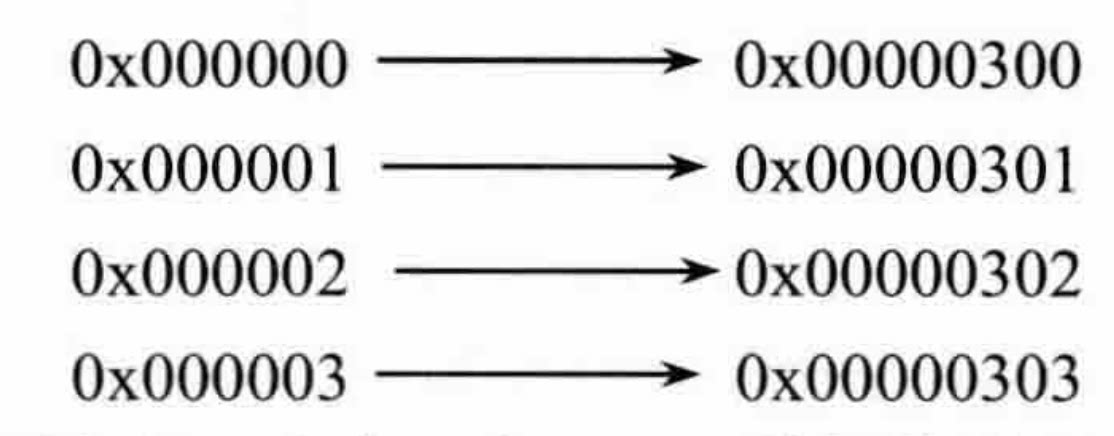
其中 0x000002 为预留码。注意,当 RBSP 数据的最后一字节等于 0x00 时 (这种情况只会在 RBSP 的末尾是 cabac_zero_word 时出现),字节 0x03 会被加入数据的末尾。0x03 称之为防竞争字节(Emulation Prevention Bytes)。我们把加入防竞争字节后的 RBSP 称为扩展字节序列载荷(Encapsulated Byte Sequence Payload, EBSP)。
经过冲突避免后的 EBSP 可以直接作为 NALU 的载荷信息,在其前增加 NALU 头就生成了 NALU:NALU = NALU Header + EBSP。NALU 的语法结构见下表,表中详细给出了 RBSP 的冲突避免方法。其中,NumBytesInNalUnit 表示 NALU 的字节数,emulation_prevention_three_byte 为冲突避免时插入的 0x03。
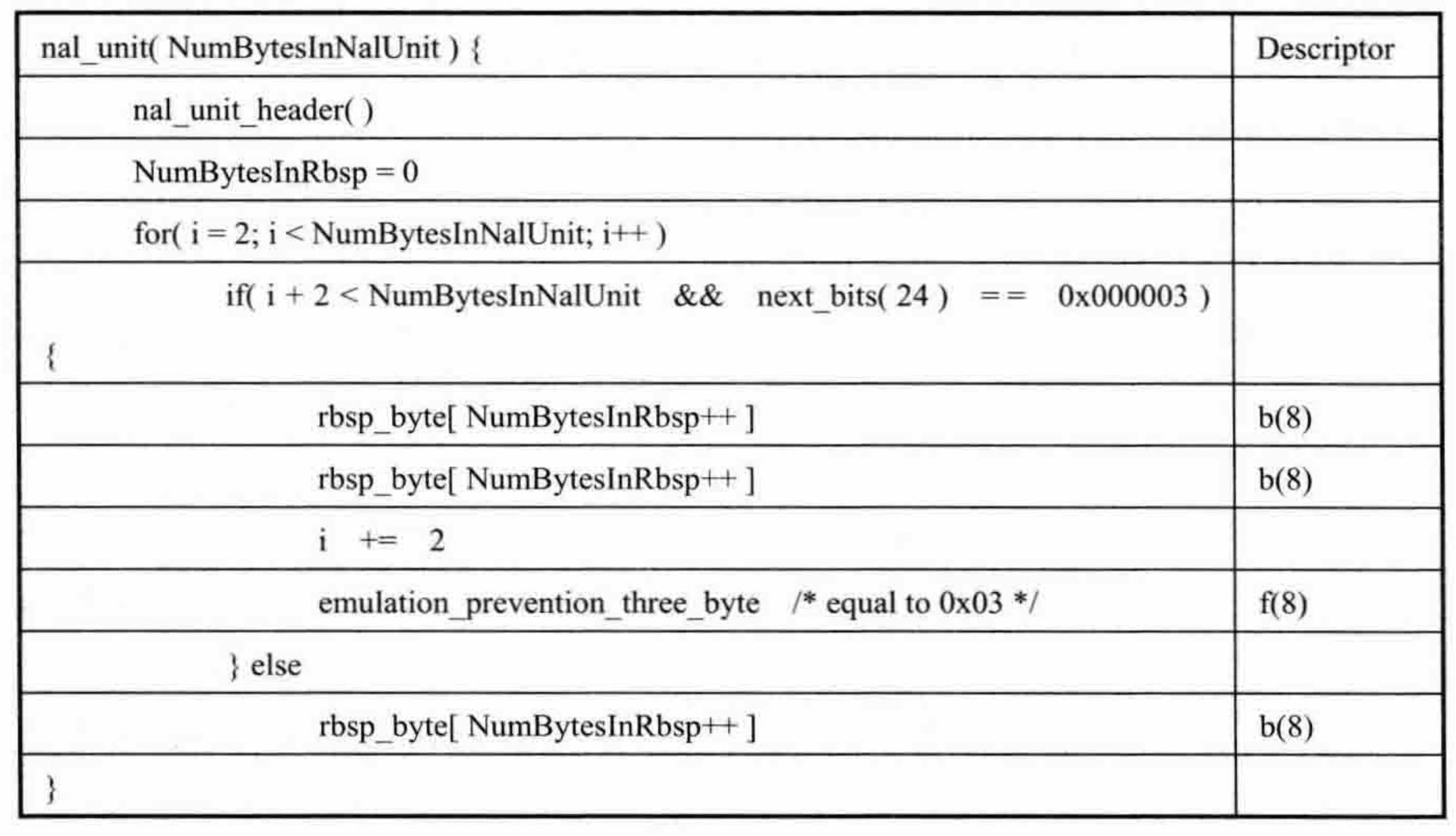
SPS 部分语法结构见下表:
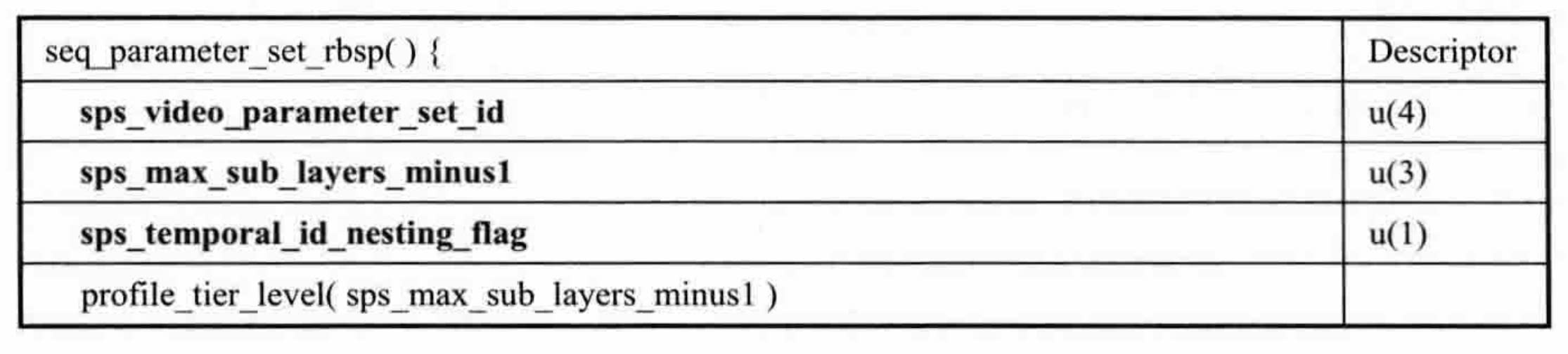
其中 Codec 参数需要的字段在 profile_tier_level 内,其部分语法结构见下表:
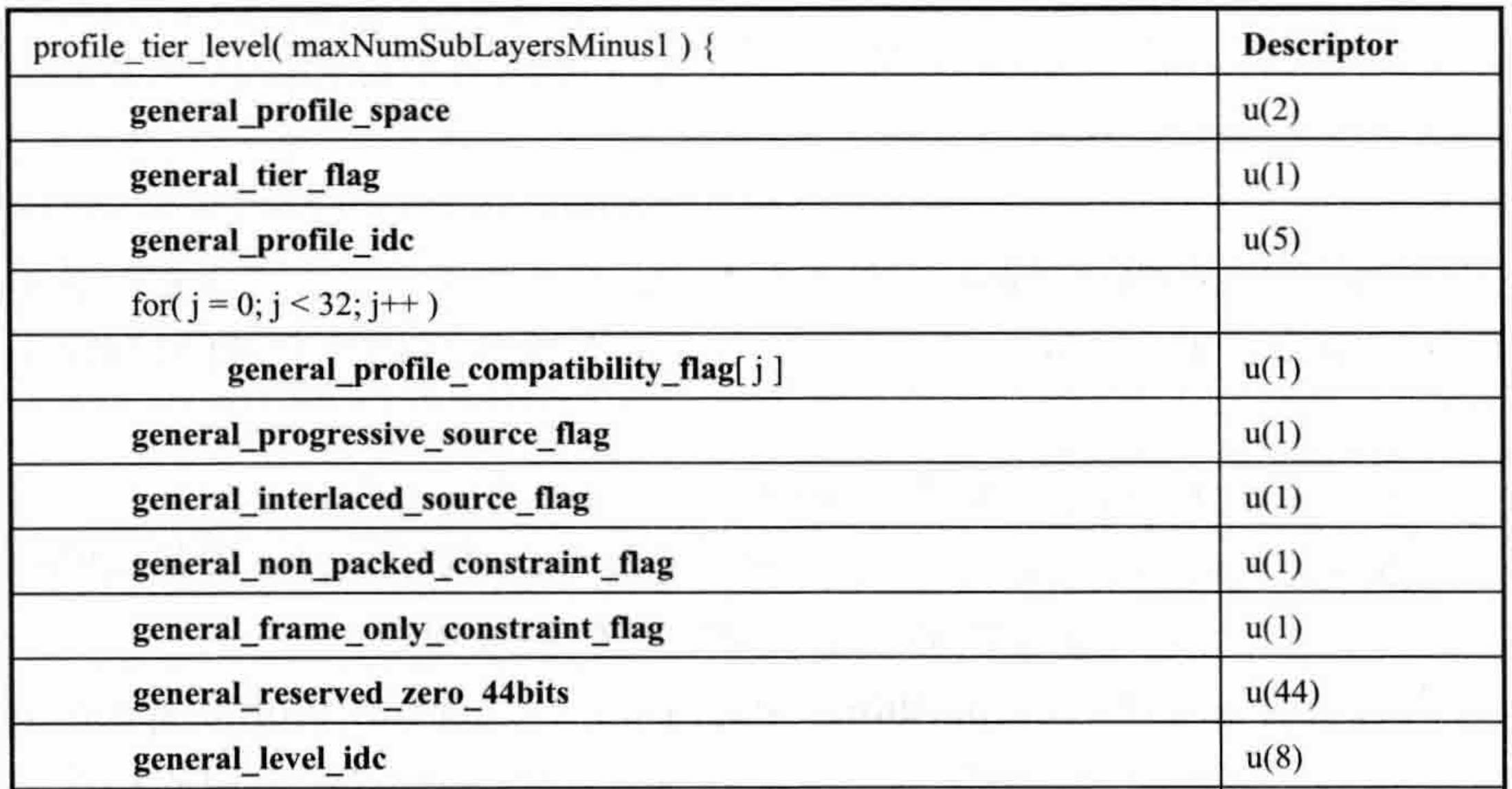
结合上面的语法结构,我们就可以实现 SPS 的解析了。
首先实现 EBSP 转换为 RBSP:
function ebsp2rbsp(uint8array) {
    let src = uint8array;
    let srcLength = src.byteLength;
    let dst = new Uint8Array(srcLength);
    let dstIdx = 0;

    for (let i = 0; i < srcLength; i++) {
        if (i >= 2) {
            // Unescape: Skip 0x03 after 00 00
            if (src[i] === 0x03 && src[i - 1] === 0x00 && src[i - 2] === 0x00) {
                continue;
            }
        }
        dst[dstIdx] = src[i];
        dstIdx++;
    }

    return new Uint8Array(dst.buffer, 0, dstIdx);
}
SPS NALU 通过指数哥伦布码(Exponential-Golomb coding)方式编码,该算法的介绍不在本文的范畴,可以参考 hls.js ExpGolomb class 的实现。
function parseSPS(uint8array) {
    const rbsp = ebsp2rbsp(uint8array);
    const eg = new ExpGolomb(rbsp);

    /* remove NALu Header */
    eg.readBits(16);

    const vpsId = eg.readBits(4);
    const maxSubLayersMinus1 = eg.readBits(3);
    const temporalIdNestingFlag = eg.readBits(1);
    const generalProfileSpace = eg.readBits(2);
    const generalTierFlag = eg.readBits(1);
    const generalProfileIdc = eg.readBits(5);

    const generalProfileCompatibilityFlags = [];
    for (let i = 0; i < 32; i++) {
        generalProfileCompatibilityFlags[i] = eg.readBits(1);
        if (i > 0 && generalProfileIdc === 0 && generalProfileCompatibilityFlags[i]) {
            generalProfileIdc = i;
        }
    }

    const generalConstraintIndicatorFlags = [];
    for (i = 0; i < 6; i++) {
        generalConstraintIndicatorFlags.push(eg.readByte());
    }

    const generalLevelIdc = eg.readByte();

    return { vpsId, maxSubLayersMinus1, temporalIdNestingFlag, generalProfileSpace, generalTierFlag, generalProfileIdc, generalProfileCompatibilityFlags, generalConstraintIndicatorFlags, generalLevelIdc };
}
参数解析
参考 Codec 语法解析章节的内容,从 SPS 解析 Codec 的过程如下:
- generalProfileSpace: 编码为「0、1、2、3」,解码时应对取值为「空、A、B、C」
- generalProfileIdc: 编码为十进制,解码时直接取值
- generalProfileCompatibilityFlags: 编码为 32 位的二进制 reverse 后的结果,解码时将其 reverse 后再取值为十六进制
- generalTierFlag: 编码为「0、1」,解码时对应取值「H、L」
- generalLevelIdc: 编码为十进制,解码时直接取值
- generalConstraintIndicatorFlags: 编码为 6 个字节的二进制,解码时以
.分割每个字节并将值转成十六进制,省略为零的尾随字节
依据此算法实现 getCodec:
function getCodec(sps) {
    const codecs = ['hvc1']; // 可以根据 box 类型来声明 codec tag
    const space = sps.generalProfileSpace;
    codecs.push(
        (
            space > 0 && space < 4 ?
                String.fromCharCode(64 + space) :
                ''
        ) +
        sps.generalProfileIdc.toString()
    );
    codecs.push(
        sps.generalProfileCompatibilityFlags
            .reverse()
            .reduce((ret, flag) => (ret << 1) | flag, 0).toString(16)
    );
    codecs.push((sps.generalTierFlag ? 'H' : 'L') + sps.generalLevelIdc);

    let hasByte = false;
    const constraintStrins = [];
    for (let i = 5; i >= 0; i--) {
        const flag = sps.generalConstraintIndicatorFlags[i];
        if (flag || hasByte) {
            constraintStrins.unshift(flag.toString(16));
            hasByte = true;
        }
    }

    return codecs.concat(constraintStrins).join('.');
}
Codec 的实际应用
在视频系统架构中,Codec 可以在转码时提取由播控接口输出,或者由终端播放器解封装提取。
近期我们在放量 HEVC 的 MP4 视频,就通过在播放器内解封装提取 Codec 然后调用浏览器 API 判断其是否能够支持该编码格式:
const { supported } = await navigator.mediaCapabilities.decodingInfo({
  type: 'file',
  video: {
    contentType : `video/mp4;codecs="${codec}"`,
    width: 1920,
    height: 1080,
    /* 随便写 */
    bitrate: 10000,
    /* 随便写 */
    framerate: 30
  }
});
console.log(supported);
supported 为 true 时则可以将 HEVC 码流封装为 fMP4 再交由 MSE 进行处理和播放;为 false 则使用 AVC 编码格式作为兜底。
在放量的过程中,我们也遇到了支持 HEVC 编码格式但不支持 MSE 以及 WebCodecs API 的情况(Safari on iOS),这时解封装提取 Codec 后交给 video 标签播放不满足部分业务对于首帧时长的要求。此时如果能使用 source 标签效果是最佳的,但播控接口没有 Codec 信息。
我们采取的办法是让这类场景的业务固定 Codec 参数,以最大层度地用上 HEVC 格式:
import { Source, Videox } from '@ali/react-videox';

<Videox>
    <Source src="//cdn.com/hevc.mp4" type="video/mp4;codecs=hvc1.1.6.L150.90" />
    <Source src="//cdn.com/avc.mp4" type="video/mp4;codecs=avc*" />
</Videox>
固定的 Codec 如果是最高的规格,判断下来往往是浏览器不支持,那势必会影响编码格式部署的覆盖度;固定的 Codec 如果是最低的规格,则会出现判断下列是浏览器支持但实际播放时不支持,导致进入 AVC 兜底逻辑影响首帧时长。因此选择的 Codec 是已有视频中覆盖度较广的值。
代码附录
在文章的代码示例中使用的工具类代码实现参考。
class BitBuffer {
  constructor(num, length) {
      this.num = num;
      this.length = length;
      this.offset = 0;
  }
  read(readLength) {
      const startPos = this.length - this.offset - readLength;
      if (startPos >= 0) {
          let largestNumOfDigits = 0;
          for (let i = 0; i < readLength; i++) {
            largestNumOfDigits += 1 << i; // 即 largestNumOfDigits + (1 << i)
          }
          this.offset += readLength;
          return (this.num >>> startPos) & largestNumOfDigits;
      } else {
          throw RangeError('读取位数超过限制');
	  }
  }
}

class ByteBuffer {
    constructor(buffer) {
        this.dataview = new DataView(buffer);
        this.start = this.offset = this.dataview.byteOffset;
        this.end = this.dataview.byteLength;
    }

    read(byteLength) {
        const offset = this.offset;
        this.offset += byteLength;

        const dataview = this.dataview;

        const getUint24 = function(offset) {
            return (dataview.getUint16(offset) << 8) + dataview.getUint8(offset + 2);
        }

        const getByte = function (byteLength, offset) {
            switch (byteLength) {
              case 1:
                return dataview.getUint8(offset);
              case 2:
                return dataview.getUint16(offset);
              case 3:
                return getUint24(offset);
              case 4:
                return dataview.getUint32(offset);
            }
        }

        const getByteMoreThan4 = function(byteLength, offset) {
            const maxBytes = 4;
            const deviationLength = byteLength - maxBytes;
            const prefix = dataview.getUint32(offset);
            const maximum = (256 ** deviationLength);
            const left = prefix * maximum;
            const right = getByte(deviationLength, offset + maxBytes);
            return left + right;
        }

        return 4 >= byteLength ? getByte(byteLength, offset) : getByteMoreThan4(byteLength, offset);
    }
}
参考资料
- IETF RFC6381: The ‘Codecs’ and ‘Profiles’ Parameters for “Bucket” Media Types
- IETF RFC7798: RTP Payload Format for High Efficiency Video Coding (HEVC)
- ISO/IEC 23008-2:2020: High efficiency coding and media delivery in heterogeneous environments — Part 2: High efficiency video coding
- ISO/IEC 14496-15:2022: Coding of audio-visual objects — Part 15: Carriage of network abstraction layer (NAL) unit structured video in the ISO base media file format
- ETSI TS 126 244-2020: A.2.2 Codecs parameter for 3GP files
- Web video codec guide
- FFmpeg hevc codec_tag 兼容问题
题图来自:What is a CODEC?